Download Optimus Toolbox
Version 3.2.1. Free beta. One installer. It installs just for your Windows account and never touches iRacing's files.
Download OptimusSetup-3.2.1.exe
Published 16 November 2026. The program checks for a newer version on launch and tells you; it never updates itself without you.
Early beta: expect frequent updates. In the first weeks we're fixing things fast — sometimes more than one update a week. Optimus tells you on its Home page when a new version is out, and updating takes a minute: your setups and everything Optimus has learned stay put. It settles down as we get closer to launch. Thanks for your patience — every report makes it better.
What you'll see the first time
Optimus is new, and Windows hasn't seen it around yet. Here's what comes up and what to do.
Your browser may ask whether to keep the file. Keep it.
Windows will show a blue box: "Windows protected your PC." It only offers Don't run at first. Click More info — the small underlined text under the message — and a Run anyway button appears. Click that.
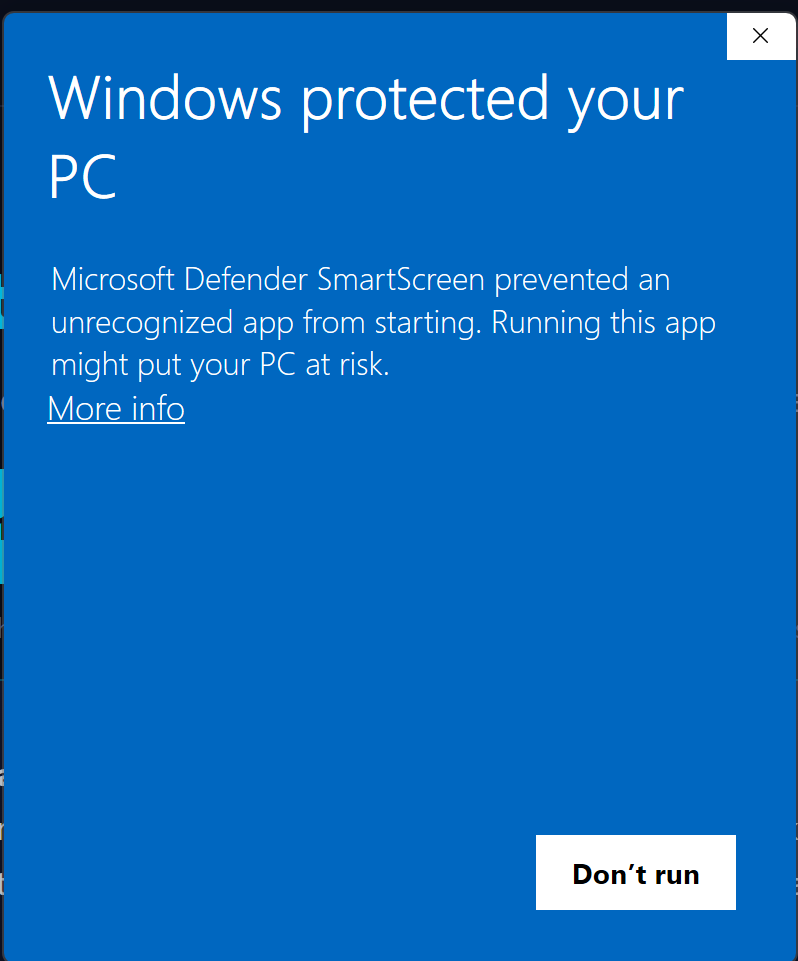
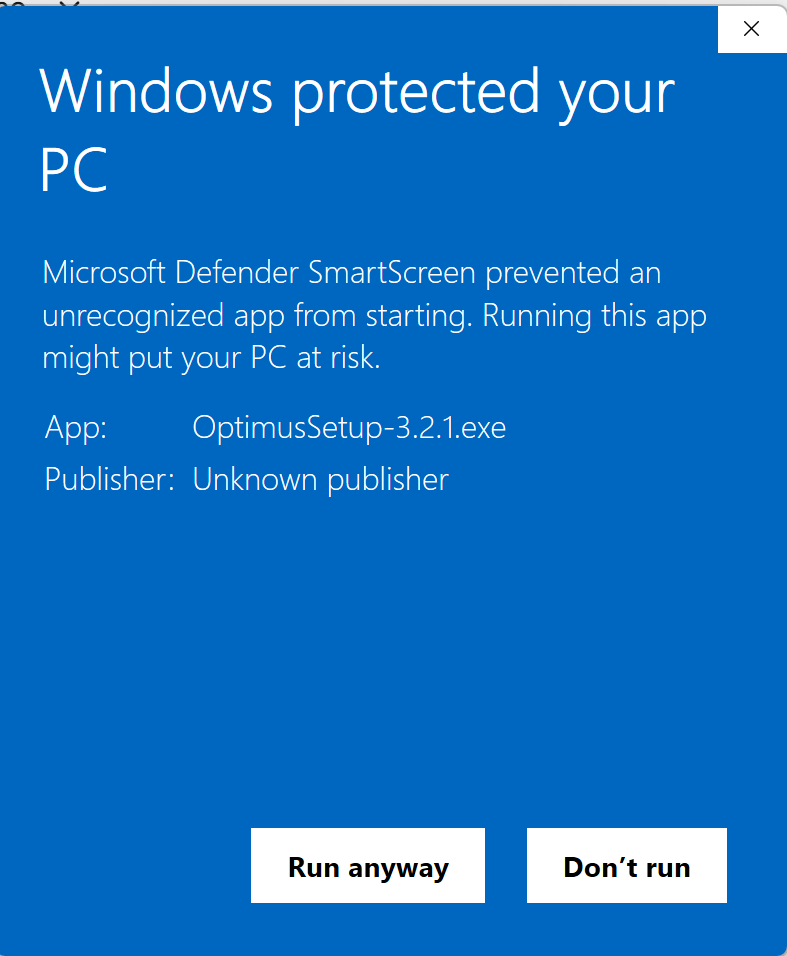
Your antivirus may ask about it too. Choose to allow or trust Optimus. Norton is the strictest about brand-new programs. You never need to turn your antivirus off, for this or for anything else.
Why it happens: Windows keeps count of how many people have installed a program. A new one hasn't been installed enough times to be recognised yet, so it warns. It isn't something Windows found in the file. A code-signing certificate is being issued to Optimus Technologies LLC now, which is the fix — though it builds up as people install rather than switching off overnight.
Rather not run it until it's signed? That's a fair call. Wait for the signed version, or write and ask what's in it.
After it installs
- Start Optimus from the Start menu or the desktop icon (can't spot it? Press the Windows key and type Optimus). The very first start can take several seconds while Windows checks the new program — after that it opens in a second or two.
- Get your free beta license. Optimus asks for it the first time: type your name and email and press Get beta access. It activates itself — there is nothing to paste or wait for. If beta spots are full you'll be put on the list. Already have license text someone sent you? Paste it in the box below instead.
- Press Sync from iRacing on the Home page. Optimus finds the setups you've exported and files them by car and track.
- No exports yet? Open a setup in iRacing's garage and press Export once per setup. The Help page walks through it.
Uninstalling
Settings → Apps → Optimus → Uninstall. Your setups and everything Optimus has learned from them are kept, so a reinstall picks up right where you left off. If you want them gone too, ask and we'll show you how.
Home · Optimus Sim Racing · Phoenix, Arizona · support@optimussimracing.com · YouTube · Not affiliated with iRacing.com Motorsport Simulations.